
Fire Alarm Logbook: What Must Be Recorded + Example Entries
A fire alarm logbook is not paperwork for the sake of it — it’s the record that shows your system is being checked, defects are managed, and any actions taken are traceable. If you’re the Responsible Person (or you manage a site), keeping the logbook up to date is one of the simplest ways to stay organised and demonstrate good fire safety management.
This guide explains what should be recorded in a UK fire alarm logbook and includes example entries you can copy.
For general UK guidance on workplace fire safety responsibilities, use this single reference.
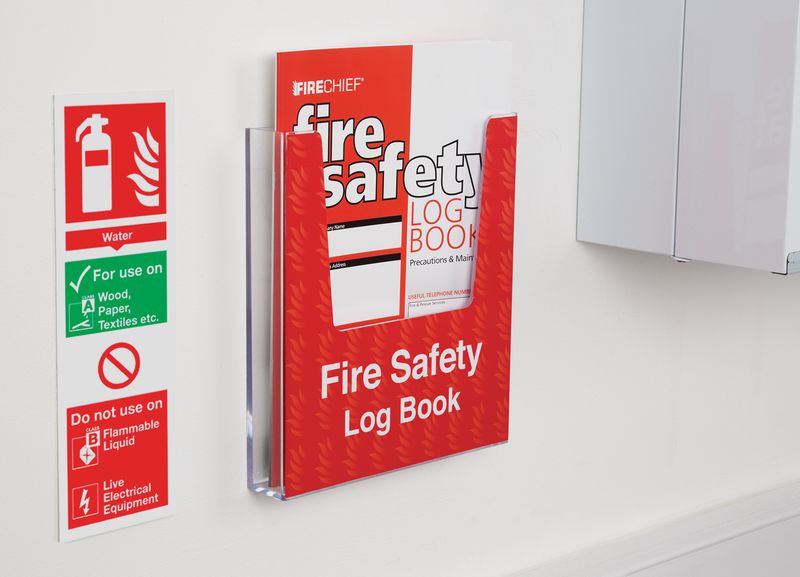
What is a fire alarm logbook?
A logbook is the site’s ongoing record of:
- Routine testing (e.g., weekly call point test)
- Fire alarm activations (real or unwanted)
- Faults and defects
- Disablements and isolations (with time limits)
- Engineer visits, servicing, and repairs
- Any changes to the system
In short: if something happens on the fire alarm system, it should be recorded.
What must be recorded in the logbook (practical checklist)
1) Weekly user tests
Record:
- Date/time of the test
- Which manual call point was tested (location)
- Result (sounders operated / panel received signal / reset successful)
- Name/signature of the person who did it
- Any issues noticed
Tip: Rotate the call point each week so you test a different point and cover the building over time.
2) All activations (fire, false alarm, unwanted signals)
Record:
- Date/time
- Location/zone/device that activated
- What caused it (if known)
- Actions taken (reset, investigation, call-out)
- Whether Fire & Rescue attended (if applicable)
- Any follow-up required
3) Faults and defects (and how they were managed)
Record:
- The exact panel message (e.g., Battery Fault, Mains Fail, Earth Fault, Device Missing)
- Zone/loop/device number
- Time first noticed
- Actions taken on site (acknowledge/silence buzzer)
- When the engineer was contacted / reference number
- Date/time fault cleared and how
Key rule: don’t just write “fault” — write what it was.
4) Disablements / isolations (this is critical)
If any zone/device/sounder/output is disabled, record:
- What was disabled (exactly)
- Why (e.g., planned works, contamination risk)
- Start time/date
- Who authorised it
- Compensating measures (if relevant)
- End time/date (when re-enabled)
- Confirmation system was returned to normal
Disablements should never become “normal”. The logbook is how you keep control.
5) Engineer visits, servicing, and repairs
Record:
- Company/engineer name
- Date/time attended
- Work completed (tests, device replacements, battery change, fault-finding)
- Any recommendations (e.g., replace ageing devices, re-site detector, improve labelling)
- Any outstanding actions
6) Changes to the system
Record:
- Additions/removals of devices
- Zone changes
- Detector type changes (smoke ↔ heat)
- Any works impacting the system
Even small changes matter later during fault-finding or audits.
Example fire alarm logbook entries
Example 1 — Weekly test (pass)
Date/Time: 04/03/2026 – 09:00
Test: Weekly call point test (MCP)
Location: Ground floor corridor – MCP by main entrance
Result: Alarm activated, sounders operated, panel indicated correct zone, system reset OK
Action: None required
Completed by: [Name]
Example 2 — Fault noticed (battery fault)
Date/Time: 04/03/2026 – 11:15
Issue: Battery fault displayed on panel
Details: PSU/Battery fault indicator active (no fire signal)
Action taken: Panel buzzer silenced, fault recorded, engineer contacted
Engineer reference: [Ref] – visit booked for 05/03/2026
Completed by: [Name]
Example 3 — Disablement during works (controlled)
Date/Time: 06/03/2026 – 08:30
Disablement: Zone 2 smoke detection disabled (planned ceiling works)
Reason: Dust risk during drilling/sanding
Authorised by: [Name/Role]
Compensating measures: Fire watch in affected corridor during works / increased checks
Re-enabled: 06/03/2026 – 13:45 (zone re-enabled, panel normal)
Completed by: [Name]
Example 4 — Unwanted activation (steam)
Date/Time: 07/03/2026 – 07:10
Activation: Smoke detector activated
Location: First floor landing outside bathroom
Cause: Steam from shower (bathroom door left open)
Action taken: Area checked, reset completed, occupants advised
Follow-up: Review detector siting / ventilation at next service visit
Completed by: [Name]
Common logbook mistakes (that cause problems later)
- Writing “tested OK” with no location/device details
- No record of disablements (or no re-enable time)
- Repeated faults with no escalation trail
- No evidence of engineer attendance or corrective actions
- No pattern tracking (same device activates repeatedly)
FAQ
Do I need a fire alarm logbook in the UK?
Most workplaces and managed premises should keep a log of testing, faults, and maintenance as part of good fire safety management. It’s a practical way to show checks are being done and defects are controlled.
How often should we do weekly fire alarm tests?
Weekly user testing is common practice: trigger one manual call point each week (rotating locations) and record results.
What should I write when the panel shows a fault?
Record the exact fault message, any zone/loop/device info, the time noticed, what you did (e.g., silenced buzzer), and when you contacted the engineer. Then record the fix and date cleared.
Can we disable zones to stop nuisance alarms?
Only as a controlled, temporary measure with clear reason, authorisation, start/end times, and (where needed) compensating measures. Always record it.
What’s the difference between servicing records and the logbook?
Servicing records come from the engineer/maintenance visit. The logbook is the ongoing site record covering weekly tests, activations, faults, disablements, and actions.
Contact us
Need help getting your fire alarm logbook under control?
If you want a simple, compliant routine for weekly tests, fault handling, and logbook entries — or if your panel is showing recurring faults — VMT Solutions Ltd can help. We provide professional fire alarm maintenance and support across Telford, Shropshire and the wider West Midlands.
Get in touch:
- Call: 07955 220516
- Email: [email protected]
- Contact form
If you can, send a photo of the panel message and your recent log entries — it helps us spot patterns and advise faster.