Fire Alarm Faults – 10 Common Causes (UK)
Fire alarm faults UK are one of the most common reasons a fire alarm system becomes unreliable — and they should never be ignored.
If you’re a Responsible Person (or manage a site), the goal is simple:
- Keep life safety coverage intact
- Restore the system quickly
- Record actions in the logbook
- Escalate to a competent engineer when needed
Below are 10 of the most common causes we see on UK sites, plus what you can do immediately and what an engineer will typically check.
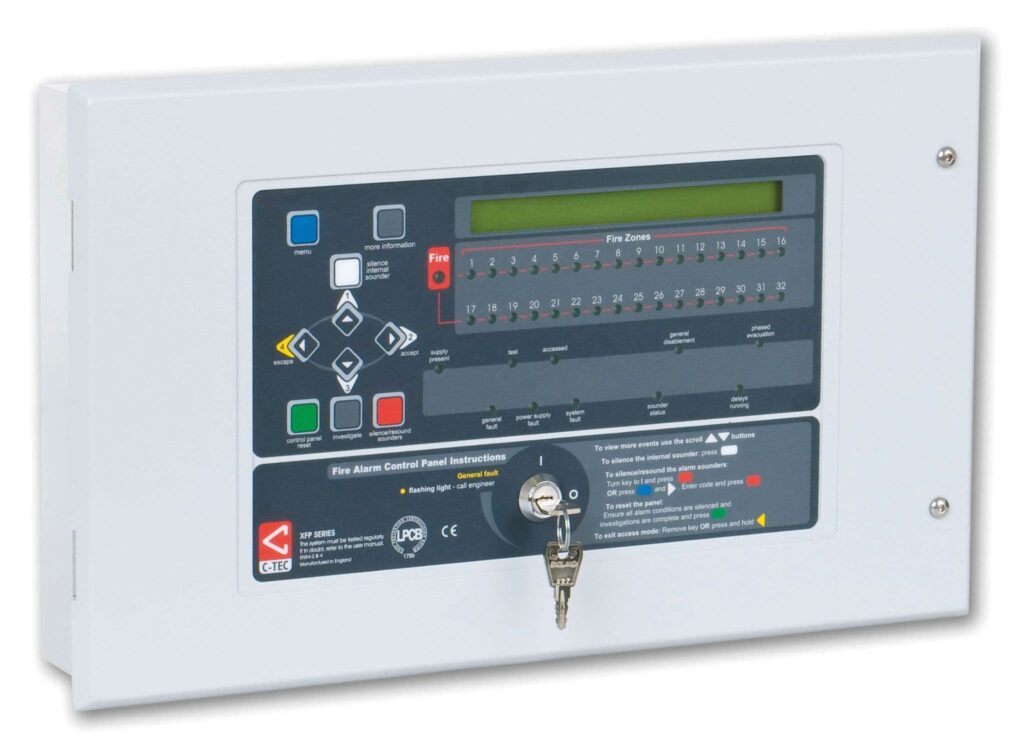
What a “fault” usually looks like
Most modern control panels will show one (or more) of the following:
- General Fault / System Fault
- Power Supply Fault / Battery Fault / Mains Fail
- Earth Fault
- Sounder Fault
- Zone Fault
- Device Missing / Communication Fault
- Disablements (sometimes mistaken as a “fault”)
Important: Don’t ignore fault beeps. If the panel has been left faulting for days, you’ve lost confidence in coverage and compliance.
In practice, fire alarm faults UK sites see most often relate to power, wiring integrity, or device communication.
What to do immediately when a fault appears
- Read the panel message properly (zone / device / loop number).
- Check if any parts of the system are disabled (disablements can create “quiet” gaps).
- Check obvious environmental triggers (steam/dust works for false alarms; faults are more about power/comms).
- Silence the internal panel buzzer (not the alarms) if appropriate so it doesn’t get ignored.
- Log it: time, message, area affected, any actions taken.
- Escalate if:
- it’s a power or battery fault,
- an earth fault persists,
- there’s multiple device/zone faults,
- the system is repeatedly faulting after resets,
- the building risk profile is higher (sleeping risk, high occupancy, high fire load).
Fire Alarm Faults: 10 common causes
1) Battery failure (or battery connection issues)
Symptoms: “Battery Fault”, “PSU Fault”, “Charger Fault”, frequent faults after mains interruptions.
Why it happens: Batteries age, terminals loosen, chargers fail, or batteries were never correctly sized/installed.
Good practice: Batteries should be tested during servicing and replaced before they become unreliable (typically every few years depending on condition, duty cycle and environment).
2) Mains power issues (local spur, isolator, or circuit problems)
Symptoms: “Mains Fail”, “Power Supply Fault”, intermittent faults after hours/weekends.
Why it happens: Switched fused spur turned off, isolator labelled poorly, circuit trips, or a loose feed.
Site check: Confirm the dedicated supply is on and protected correctly. If you find an isolator with no label, that’s a problem to fix—fast.
3) Earth faults (moisture ingress and cable damage)
Symptoms: “Earth Fault”, sometimes intermittent (worse in wet weather).
Why it happens: Water ingress in external devices, damaged insulation, crushed cables, or contamination in junction boxes.
Why it matters: Earth faults can mask deeper wiring problems and are a classic “ignore it until it becomes serious” scenario.
4) Loose connections (terminations at panel, devices, or joints)
Symptoms: Random zone/device faults, intermittent comms, “Device Missing” that clears and returns.
Why it happens: Vibration, poor terminations, movement of devices, or marginal joints.
Engineer approach: Inspect terminations, check continuity, verify loop resistance/impedance, and re-terminate where needed.
5) Detector contamination or end-of-life behaviour
Symptoms: Device faults, drift compensation limits reached, intermittent issues, “Dirty Detector” / “Service Required” on some systems.
Why it happens: Dust, insects, building works, aerosols, or simply age.
Reality on sites: This is extremely common during refurbishments. A building can “work” for months after dusty work—then faults multiply.
6) Incorrect device type for the environment (heat vs smoke mismatch)
Symptoms: Repeated nuisance events that lead to disablements; devices swapped incorrectly; fault events if incompatible bases or wrong device types are fitted.
Why it happens: Wrong detector in kitchens/shower areas, or “quick fixes” without proper design consideration.
Best outcome: Correct selection + correct location. If you’re constantly managing nuisance events, someone eventually disables a zone—creating real risk.
7) Sounder circuit faults (open/short circuit, wrong EOL, damaged cables)
Symptoms: “Sounder Fault”, “NAC Fault”, “Output Fault”, alarms might still operate but not everywhere.
Why it happens: Cable damage, incorrect end-of-line device, changes made during works, or water ingress to external sounders/beacons.
Why it matters: If notification fails in part of the building, the system is compromised even if detection is fine.
8) Manual call point issues (break-glass operated, damaged, or poor contacts)
Symptoms: Zone faults on conventional systems, device faults on addressable, or repeated activations/restore problems.
Why it happens: Physical damage, contamination, accidental operation, or poor-quality components.
Site tip: If a call point is repeatedly “problematic”, don’t just reset it—inspect the device and the area (doors, trolleys, deliveries, misuse).
9) Network / loop communication issues (addressable systems)
Symptoms: “Loop Fault”, “Device Missing”, “Comms Fault”, multiple devices dropping off.
Why it happens: Loop wiring faults, incorrect addressing, short/open circuits, failed isolators, or panel/loop driver issues.
Engineer approach: Segment testing, isolator checks, identifying the “last good device”, then fault-finding between points.
10) Building works and third-party interference
Symptoms: Sudden faults after refurb, ceiling works, network changes, power isolation, or cable routes disturbed.
Why it happens: Trades isolate power, remove ceilings, move detectors, damage cables, or disturb containment.
Best practice: Any works should include a quick check that the fire alarm remains fully functional, and any temporary changes are documented with compensating measures where required.
Fault vs False Alarm
- Fault: A technical issue that can reduce reliability/coverage (power, wiring, device missing, etc.).
- False alarm / unwanted fire signal: The system activates when there isn’t a fire (steam, cooking fumes, aerosols, etc.).
Both matter—but faults can quietly reduce protection if left unresolved.
How VMT Solutions approaches fault call-outs
On a typical fault-finding visit, you should expect:
- Panel interrogation (event logs, device history)
- Confirmation of disablements and outputs
- Electrical checks (mains/PSU/battery/charging)
- Loop/zone tests (continuity, insulation resistance where appropriate, segmentation)
- Device inspection and targeted replacement (not random swaps)
- Clear report: root cause, corrective actions, and any recommendations
FAQs
1) Can I just reset the panel and ignore the fault if it clears?
You can reset once, but if it returns, treat it as an unresolved defect. Repeated resets are how faults become “normal”.
2) Is a battery fault urgent?
Yes. If mains fails and batteries can’t support the system, you can lose coverage—especially overnight or during power interruptions.
3) Who is responsible for fixing faults?
The Responsible Person must ensure the system is maintained in efficient working order and defects are addressed. (Use the GOV.UK guide below for the plain-English overview.)
For a plain-English overview of the Responsible Person’s duties, see this GOV.UK guide on fire safety responsibilities under UK fire safety legislation.
If you’re seeing repeated fire alarm faults UK guidance is clear: investigate the root cause, log actions, and arrange competent fault-finding support.
Need help with a fire alarm fault in Telford or the West Midlands?
If your panel is showing a fault message (battery, mains fail, earth fault, device missing, sounder fault), don’t leave it “for later”. Faults can reduce reliability and, in some cases, leave parts of the building without proper coverage.
VMT Solutions Ltd provides professional fire alarm fault finding and maintenance support for domestic and small commercial sites across Telford, Shropshire and the wider West Midlands.
Get in touch today to book a visit:
- Call: 07955 220516
- Email: [email protected]
- Contact form
If you can, include a photo of the panel display (fault message and zone/loop/device details) — it helps us diagnose faster and arrive prepared.